
Linux

What is Linux?

Linux is a family of open-source operating systems that use the Linux kernel. it’s creator Linus Torvalds, first released the system in 1991.

Linux comes in a variety of flavors typically known as distributions, which are provided by variety of vendors with the most popular distributions being “Debian”, “Fedora”, and “Ubuntu”; Other prominent distributions mostly used in productions are “Red Hat Enterprise” and “SUSE Enterprise Server”.

Distributions intended for servers follow the stack solution LAMP ( Linux, Apache, MySQL, PHP/Perl/Python ). The stack solution is a very common example of a web service stack of services and all the services included are Open-Source, its worth noting that nowadays the LAMP stack may vary with the services being used however the model which it follows remains the same.

Different Linux desktop distributions also offer a variety of desktop environments each with its distinct characteristics from GNOME or KDE Plasma to environments that assist users with disabilities including Vinux which main features include Speech and Magnification, as well as Talking Arch which incorporate speech and braille for the visually impaired. You can check this out in this website.

https://opensource.com/life/15/8/accessibility-linux-blind-disabled

Linux Distributions cater to a wide variety of different customers and their needs even including the popular Penetration Testing distribution Kali Linux, which comes pre-loaded with all the necessary tools and libraries you need to conduct a PenTest.

Linux Runs the world!

One of the main reasons to consider Linux as your OS is the simple fact that it is everywhere! and the distributions are very portable and lightweight, you can have a Linux box installed in a simple and cost efficient raspberry pi in a matter of minutes, or you can install the user friendly Raspbian which can be installed on a 16gb sd card in your Pi. (not the prettiest version, but it will do)
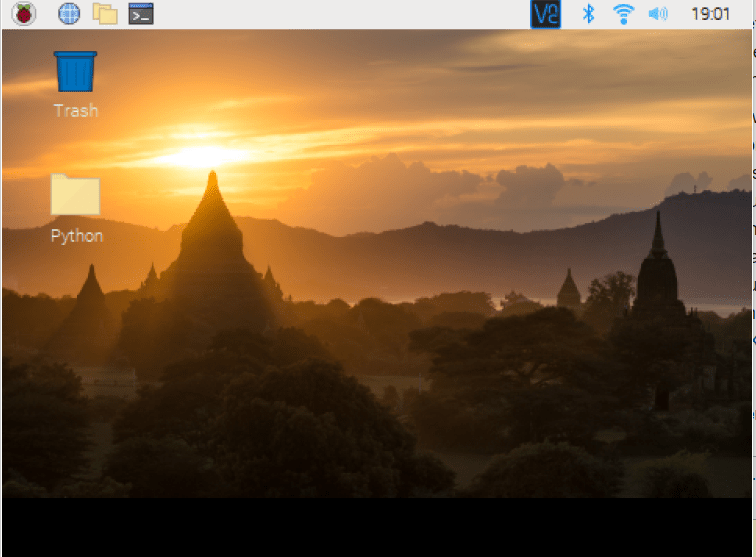
You may think devices running on Windows or MacOS are what people often use and are the most popular ones, and you would be right to certain degree (By the way, MacOS uses a form of UNIX in it).

However, when it comes to Linux? it is used to run virtually everything! from android devices, smart home and IoT, Tesla vehicles, Mercedes-Benz, video games, smartwatches, avionics, Cloud Computing… the list goes on! all of these rely on the power of Linux and the beauty of Linux being open-source is that the source code may be modified or distributed by anyone under the terms of its license. Not to mention the ability to fully modify your version to your specifications.

Linux Learning Curve

Many users do not like Linux mostly because of its complex command syntax, at least in my opinion I find them quite complex.

But the key to learning how to use it properly and take advantage of the CLI power is practice, as we stated before it is an Open-Source OS which more often that now comes with its own community forum that are there to guide you on how to use it.

Some of the most basic commands are:

ls – shows a list of items in the directory(folder)

cd – change directory (move from folder to folder)

rm – remove (delete)

alias – assigns an alias to a command (very useful)

cat – short for concatenate used in a variety of ways (mostly to view readable files)

echo – prints a string passed as an argument

exit – closes the shell

find – one of the most useful commands to find the location of a file.

whoami – will show you the username(hostname) currently in session.

These are but a few basic commands you can use in Linux to help you get started in the OS CLI.

the beauty of Linux is if you do something that causes an issue on your computer or creates what is called a Kernel Panic, most likely out there, there is a way to solve it rather easily.

The ability to modify everything in the OS is what gives Linux an advantage over its competitors contrary to other OS’ where they restrict the user certain actions that may harm the system, Linux allows you to freely change what you will, by the same token in the case that you do mess something up, you will have to know a way to fix it.

Conclusion

Learning how to operate Linux is a crucial part of any I.T professional.

The many distributions of Linux are used in all type of devices and production environments mostly because of its portability and the ability to modify the OS to suite your needs.

Learning how to use it can be a bit complex and unfamiliar at first but once you get the hang of it can easily become something of a second nature; Practice commands and play with them to get a feel for it, google projects and replicate them on your device, break it, fix it and then break it again.

Linux is a valuable tool to have handy in your IT career toolkit.

What is Cloud Computing?

The term cloud computing often refers to the ability of provisioning computing resources on-demand by providing scalable (ability to grow) and elastic (ability to both increase or decrease resources as needed). Key thing to remember is that Cloud is pretty much a fancy name for a Data center. Cloud vendors often pride themselves in their ability to provide a highly available network in the case of a disaster by having data copied over multiple locations however at a cost that is transferred over to the customer depending on the data and architecture needed.

Cloud Computing is basically a business model that may improve customer experience while reducing expenses often trading Capital expenses (large purchase of computing systems) for Operational expenses (recurring subscriptions, and usage fees) based on the customers’ needs or demands. Taking advantage of some of the technologies provided by Cloud Computing may improve a business ability to meet demands at a faster rate (Time to Market).

Cloud Solutions often cater to a variety of customers with different needs via service models.

Private – Owner has full control over the data, security and how the system operates. Additionally, the collective of resources (Fabric) may be either on the customer’s premises or off-premises.

Public – Resources are available to all consumers over an internet connection, however the customer does not have any control over how the resources operate or work with other solutions.

Hybrid – This solution refers to the ability to combine both private and public clouds for specific needs. This also allows the consumer to work with multiple cloud vendors or keep certain aspects of their business outside of the Cloud.

Cloud computing provides different models of services, you may be familiar with acronyms such as IaaS, SaaS and PaaS. In case you are not here are the concepts behind the acronyms:

Infrastructure as a Service – Vendor provides the infrastructure that would otherwise be very expensive for a customer to own or maintain. An example of this may be Hardware needed to run your business, light fixtures, SCADA systems, Heat and Ventilation (HVAC) and more.

Software as a Service – Vendor provides customer with software solutions that may only require a web browser and internet connection to be accessible from anywhere around the world without the need of a VPN. An example of this model would be cloud-storage (Google Drive, OneDrive, AWS S3)

Platform as a Service – This model is mostly aimed at developers enabling the creation and quick distribution of applications using multiple solutions that could be either open source or vendor proprietary. However, a potential drawback of developing applications under a proprietary software is the high probability of what is referred to as Vendor-LockIn in which case the customer’s software may only be compatible with the vendor’s solutions hindering the customer’s ability to integrate pplication with other business applications.

Note: Some additional models not discussed in-depth here include:

  • XaaS (Anything as a Service)
  • DRaaS (Disaster Recovery as a Service)
  • DaaS (Desktop as a Service)

Cloud Computing has recently become a force in the market for the ability to Automate tasks and provide resources without the need of specialized hardware rather by having developers create functions and specialized code for what their business needs, this may also reduce your expenses as the IaaS cost goes lower if you do not need to provision specialized equipment to do the job.

Misconceptions about Cloud Computing.

  • Security – A common misconception of Cloud Computing is that the data is not secured; This is not the case as often Cloud providers undergo very strict security audits by third-party contractors, ensuring the data is kept in a highly secured environment on their end. As an example of this, imagine the cloud solutions that have been specifically developed for Federal highly sensitive data (Believe me vendors need to secure such data in a whole different level).
  • No need for Staff – The assumption that Cloud computing will reduce staff expenditure or remove I.T staff as it will no longer be needed is completely wrong as you will need to have staff to manage and monitor your resources and continuously improve our cloud infrastructure for optimal adoption.
  • I.T – Can safely ignore the Cloud-Based solutions. If you understand the shared-responsibility model you will quickly find out that this is most certainly not the case, instead Management should focus on re-training staff to properly use Cloud Solutions.

Steps for a successful Cloud Adoption.

  • Begin by choosing a low risk application to be migrated to the Cloud as a Pilot
  • Spend some time considering which service model best suits your needs (IaaS, SaaS, PaaS)
  • Consider a variety of Cloud providers, their roles, capabilities and responsibilities (SLAs).
  • Examine the dependencies you will be inheriting when choosing a provider.
  • Assess risks and potential for Vendor-LockIn
  • Determine the possible internal changes this adoption may bring (change in roles, Salaries, training, etc)
  • Finally, always, always have a back-up plan!

Remember that Cloud computing is a relevant solution for businesses, however each business may be affected differently; From migrating applications to the decommission of old servers and services all decisions taken must result in business value.

Following standard risk assessment techniques can determine whether the benefits of Cloud Computing out-weight the potential unwanted outcomes.

Business critical services might be best suited for internal management and not the Cloud, however as an administrator or start-up you will have to spend some time researching that.

Risk Assessment.

Here are some key points to consider when assessing Cloud Computing solutions:

  • Potential for Vendor-LockIn.
  • Ensure the Vendor will not run a risk of going out of business.
  • Steered cleared of customer specific software as re-purposing them could be costly.
  • Beware of Cloud management tools provided by Vendors as they could potentially create LockIn
  • Have a contingency plan, plan for failure.

Realizing Cloud Benefits.

  • Articulate the business benefits and value from Cloud Computing
  • Ensure applications can be re-used and able to integrate properly with other components
  • Develop a “Service-Oriented Architecture”
  • Become familiar with Cloud Computing Models and responsibilities.
  • Develop a detailed and comprehensive requirement contract on the “SLA”
  • Understand that Security and Risk Management in the Cloud are just different.
  • Variable costs require highly skilled individuals to handle finances.
  • Develop a business vision of what you wish to accomplish when migrating to Cloud.
  • Monitor and evaluate results for efficiency. (issues must be addressed immediately).
  • Plan to decouple applications. Interdependent applications may not work well in the cloud.

Conclusion:

Business around the world are realizing the values that Cloud Computing is bringing to the table. The ability to develop and provide services within seconds has become the most appealing aspect of this relatively new business model.

Multiple Cloud Providers have become aware of the knowledge gap in the technology field and have develop proprietary technical certifications for professionals that wish to work with these solutions.

The certifications range from foundational level to advanced or professional level.

Currently AWS Solutions Architect certification is one of the most desirable as well as one of the highest paid certifications in the industry.

Professionals may also pursue specialty certifications in fields such as Security, Networks, Big Data and the very popular Machine Learning.

As always, thank you for spending some time reading this today.

Learning Together.

Let’s Talk About CyberSecurity

What is CyberSecurity?

CyberSecurity refers to the concept of protecting your hardware, software and most importantly personal or business data from outside or inside threats (more on this later). One thing to keep in mind is that CyberSecurity does not only refer to the protection of data but also encompasses the protection of physical components and perimeters.

CyberSecurity also refers to the ability to prevent, mitigate or deter disruptions of computer systems in a network.

CyberSecurity follows three basic principles known as CIA :

· Confidentiality – information is protected from non-authorized individuals.

· Integrity – information has not been altered in transit or at rest.

· Availability – information accessible only to users previously authorized.

Often as Security requirements increase the user’s convenience is compromised, this has become a problem for many industries when trying to protect their valued customers…

Think about how annoying it is to remember a sixteen-digit password with symbols and numbers! Now think about having twenty different accounts with twenty different passwords! Don’t you think it’s more convenient to have just one password for all your accounts? Why yes! It is more convenient! For the Attacker!!!!…

Currently, there is a high demand for CyberSecurity Professionals. As technology has significantly increased its presence in our daily lives in the shape of our smart phones, smart watches, smart TVs and Internet of Things devices, so to has the need to protect the data that is collected and shared with the devices has increased… Understand that with each smart device you add to your lifestyle you have also therefore added another point of vulnerability (also referred to as an attack vector) that may potentially be exploited by a Threat Actor or commonly known as Hackers.


What is a Threat Actor / Hacker?

Well a Hacker or Threat Actor is an individual or group of individuals who uses computer systems to gain unauthorized access to different types of information usually with malicious intent. Threat actors also come in different flavors and their intent varies, below I have outline some of the different types of threat actors.

· Script Kiddies: these individuals use attack software to perpetrate an attack however they lack in-depth knowledge.

· Hacktivists: Attackers who attack for ideological reasons.

· Nation/State Actor: these group has a very in-depth knowledge of computer systems and may be commissioned by governments.

· Advanced Persistent Threat: individuals performing an attack using multi-layer intrusion campaigns targeting highly sensitive data.

· Insider threat: Ah! The disgruntled employee who maliciously gave data away to competitors or corrupted the data.

· Cyber-terrorists: politically guided attackers that create massive disruption and spread fear in society.


How can you defend against an attack?

Well this one is tricky as there are no sure ways to defend against attackers (there are so many different ones!). However here are five basic principles you can follow to mitigate or reduce the impact an attack may have in your organization or your personal life.

Layering: information whether highly sensitive or not should be secured in multiple layers this may also be referred as defense-in-depth.

Limiting: this principle refers to limiting the access of information to only authorized users, using either technology (file permissions) or procedures (prohibiting the removal of information from the premises).

Diversity: while following the principle of layering implement software or hardware from multiple vendors. This approach will give you an edge when securing your information as the attacker would have to be familiar with a variety of vendor and/or vulnerabilities.

Obscurity: Hiding hardware or software information from outsiders; The attacker would have to find out what type of device or software you are using and then find its vulnerabilities.

Simplicity: A hardened system should be easy to access from inside but difficult from the outside, implementing inbound access control lists is an example of this principle. However other principles should be implemented inside the network as we have previously discussed “Inside Threat”.Following the principles listed above should give you a basic security approach.You can also check frameworks or network architecture references, they provide you with industry standards and resources as to how you can create a secure environment for your network… keep in mind that some frameworks are aimed at specific business sectors, so make sure you look for the one that fits your needs.


Conclusion:

CyberSecurity should now be a way of thinking when it comes to securing your information, the false sense of security we have now a days needs to come to an end, we need to be informed of what is out there and how is our data being manipulated or accessed by individuals without us even knowing.Remember that CyberSecurity should be implemented all around you! A full 360, no sense in locking the front door if the windows will be open all night!We will soon look at some of the most common types of malicious attacks!.Thank you for taking time to read this post! If you like it, please share it with a friend!.Let’s work towards a more secure future!!!